
Create purchase incidents
📍 Create an incident when uploading documents
📍 Create an incident when the document is already digitized
📍 Create an incident in the order review process
You can add or create incidents for your purchases during document upload or when the document is already digitized. You can also do it directly in the order review process.
🆙 Create an incident when uploading documents
- Upload a document. Do you have questions? We explain how in this article.
- Select the incident reason.

- Add a comment related to the incident.
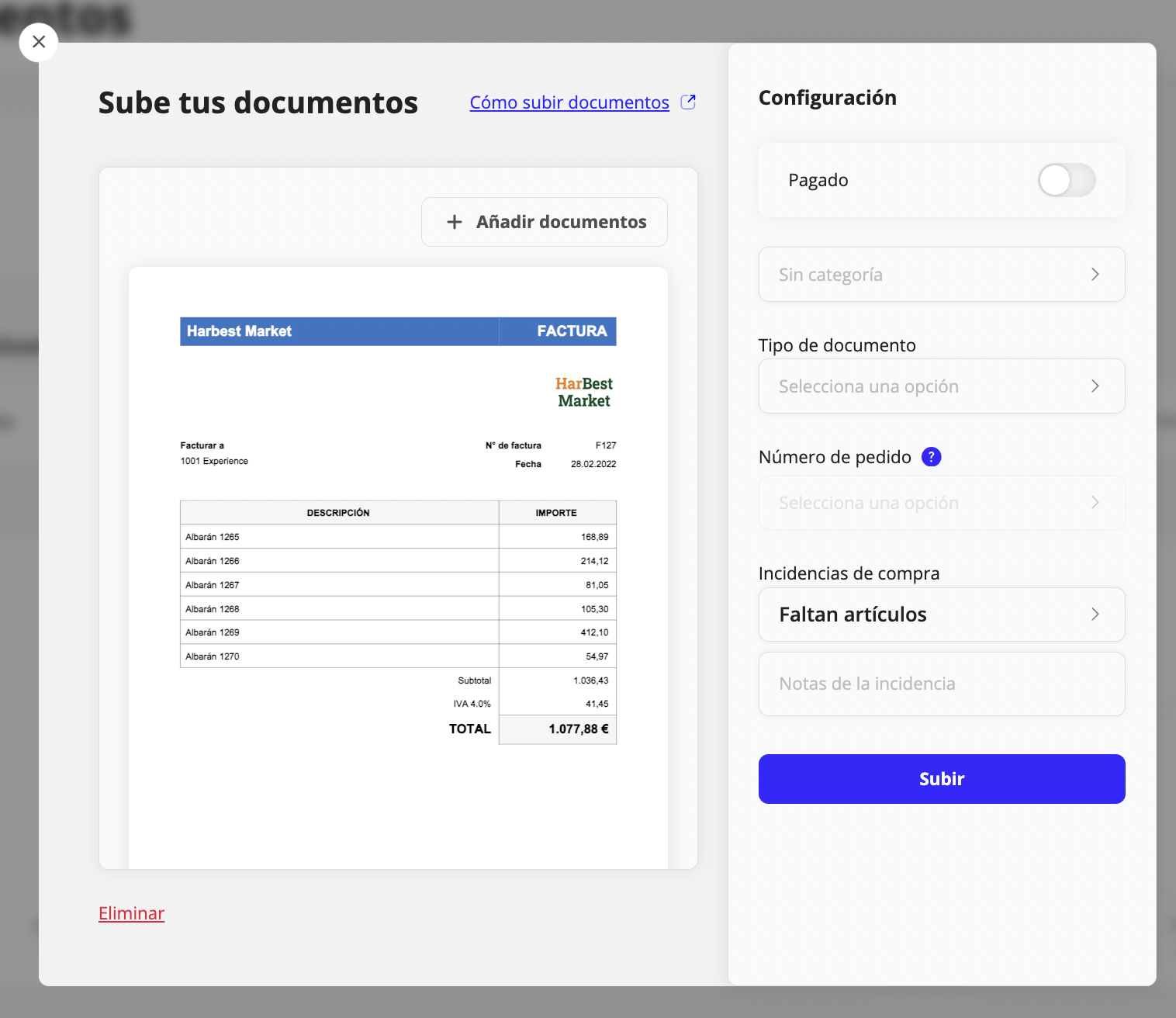
📃 Create an incident from the already digitized document
1. Open the document you want to add the incident to.
- Click "Add incident".

- Select an option from the dropdown and add more details about the incident.

🛒 Create an incident in the order review process
- Click the Shared order you want to review.

- Select the products that arrived incorrectly by marking the X.

- You will be able to add the incident from the same screen. If you have questions about how to manage product incidents in orders, you can visit this article.

- Click Save and the incident will be created automatically in haddock's Incidents section.
📨 Created incidents page
On the incidents page you can see who created it, its status, add extra comments, and once it has been resolved, mark it as resolved.

Updated on: 26/08/2026
Thank you!